
One program for the whole journey of a video, from shoot to broadcast and social media.
It transcodes, edits, subtitles, cleans audio, enhances the picture with AI and publishes directly. Everything runs on your computer, with no cloud and no monthly per-minute fees.
ORCA Coder was born in Czech television and radio practice. It replaces your encoder, quick-edit tool, subtitling program, audio plugin and social uploader. From one recording it prepares a broadcast master, a web version and captioned 9:16 clips for TikTok, Reels and Shorts in minutes.
Four sources, one program, four outputs
ORCA Coder plugs in where material is created and leaves: at the editor's workstation, in the newsroom and at the broadcast output. No need to change your editing software or playout.
Footage from a camera, stream or microphone passes through one program and goes out to broadcast, web, social and archive.
Why newsrooms choose ORCA Coder
One source, every output at once.
Broadcast master, web, YouTube, Facebook and a vertical clip come out of a single transcode. The source is read only once for all versions.
No cloud, no per-minute fees.
Speech transcription, AI picture enhancement and audio cleanup run right on your computer. Footage never leaves the newsroom until you publish it.
GPU speed.
Encoding on Apple Silicon (VideoToolbox), NVIDIA, Intel and AMD. AI models on the Neural Engine or GPU.
Broadcast quality without compromise.
Loudness exactly at −23 LUFS per EBU R128, playout formats, QC of every output and a log of what happened to each file.
Social media in one click.
The best moments of an interview as 9:16 clips with word-by-word captions and a smart crop that keeps the speaker centred.
Automation without a programmer.
Watch folders, distribution lists, scheduled recording and publishing. Whatever you drop into a folder gets transcoded and sent automatically.
Built in Czech from day one.
Czech interface and help, Czech transcription, Czech diacritics in subtitles, designed around real Czech newsrooms. The interface is also available in English.
This is ORCA Coder
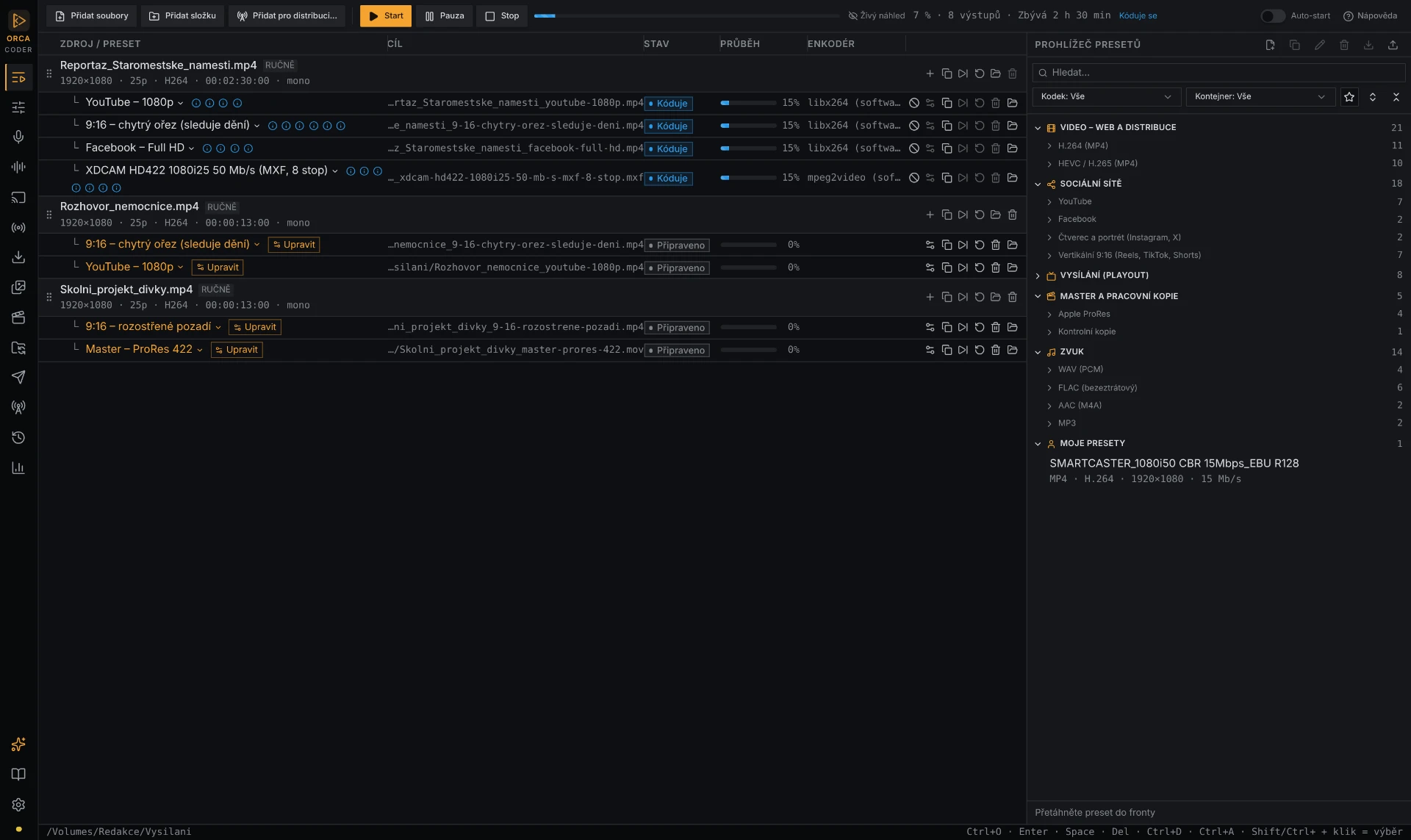
Multiple outputs per file, drag-and-drop presets, parallel encoding and live progress.
Who ORCA Coder is for
A report from a camera or phone → broadcast format, web version and a captioned 9:16 clip in a single transcode
Playout deliveries (XDCAM, AVC-Intra, IMX), EBU R128 loudness, distribution of one show to multiple stations
Recording, voice cleanup, mixing with a music bed, broadcast archive and monitoring, audiograms for social
Batch transcodes, previews, proxies, ProRes and DNxHD masters, output QC
Quick social clips, photo edits, thumbnails, scheduled publishing across multiple accounts
Captioned recordings of council meetings and events, archive, publishing without a technician
What ORCA Coder can do
Transcoding and queue
- A queue like Adobe Media Encoder: multiple outputs per file, drag-and-drop presets, parallel encoding.
- Dozens of proven presets: H.264, HEVC, ProRes, DNxHR, YouTube, Facebook, Instagram, TikTok, X, LinkedIn.
- Playout: XDCAM HD422, AVC-Intra 100/50, IMX 50, DNxHD, start timecode, mono tracks.
- EBU R128 −23 LUFS within ±0.2 LU, measured on the finished file.
- Deinterlacing, Rec.601 → Rec.709, HDR → SDR, LUTs.
- QC of every output, live preview and a quick 10-second draft.
Video editing
- In/Out trimming, cropping, rotation, intro, outro or ad break.
- Text-based editing: delete words in the transcript and they disappear from the video.
- Remove filler words and long pauses in one click.
- Station graphics: lower thirds (also from CSV), clock, ticker, LIVE badge.
- Smart 9:16 crop that keeps the face centred.
- Picture restoration: noise, dust, flicker, blocking, shake, faded colors.
AI for picture
- Colorization of black-and-white footage and photos.
- Background removal, blur or replacement.
- 2× to 4× upscaling with reconstructed detail.
- Smooth motion and slow motion (25 → 50 fps).
- All on the Neural Engine / GPU, right on your computer.
Subtitles and text
- Automatic subtitles from speech (Whisper) without the cloud, as SRT and VTT or burned in.
- Reviewable transcript, export to Word and TXT, speaker detection.
- Word-by-word captions: 7 templates, karaoke, TikTok and Reels safe zones, 9 fonts with full diacritics.
Audio
- Studio voice: noise and echo reduction, hum, clicks, de-esser, compression.
- In-app voice recording with meters and markers.
- Mixing with a music bed: automatic ducking under speech.
- Send recordings via FTP, e-mail or AirDrop.
Social media and publishing
- Best moments: coherent captioned 9:16 clips from a long interview.
- Audiogram with waveform, title, logo and captions.
- Direct upload to YouTube, Facebook, Instagram, TikTok, X, LinkedIn, Vimeo and more.
- Storage: network drive, FTP/SFTP, S3, Google Drive, Dropbox, OneDrive.
- Multiple accounts per network and scheduled publishing.
Images
- Batch resizing and conversion (JPG, PNG, WebP, AVIF, TIFF, HEIC).
- 1:1, 4:5, 9:16 crops, watermark, file size limit.
- PDFs and presentations to images, slide by slide.
- AI photo edits: enhancement, colorization, product on white.
Live streams, radio and downloads
- Stream recording (HLS, SRT, RTMP, RTSP, UDP, Icecast) with a scheduler.
- IPTV and DVB-T2 channels (M3U, HDHomeRun).
- Radio monitoring: hourly archive, alarm on silence or outage.
- Download non-DRM web video you hold the rights to.
Automation
- Watch folders: files transcode and publish themselves.
- Distribution lists: one show → versions for every station.
- Notifications via e-mail, Telegram, Slack or Teams.
- Work statistics with Excel export.
How it works in practice
- 1
A camera operator or reporter drops the footage into a network watch folder.
- 2
ORCA Coder automatically creates the broadcast file (XDCAM HD422, −23 LUFS) in the playout folder.
- 3
At the same time a web and YouTube version with subtitles and a thumbnail is created and uploaded to the newsroom account.
- 4
The reporter gets a Slack or Teams notification that it is done.
Your footage stays in your newsroom
macOS (Apple Silicon) and Windows 10/11 (x64). The Mac app is signed and notarized by Apple.
Everything local. Transcription, AI models and encoding run on your computer. Only what you publish goes online.
GPU. VideoToolbox and Neural Engine on Mac, NVIDIA NVENC, Intel Quick Sync and AMD on Windows.
Passwords and credentials are stored in the macOS Keychain or Windows Credential Manager, never in text files.
Add-ons on demand. AI models and fonts download on first use; the app notifies you about new versions.
Originals are never overwritten. Every output is a new file; metadata and GPS location are stripped from photos.
Perpetual licence for 1 computer with a year of updates.
Pay once and ORCA Coder is yours forever. You get every update for 12 months, then you can extend updates. The full version is free for the first 14 days.
What people ask
Do I need an internet connection?
Only for publishing, downloading add-ons and occasional licence checks. Transcoding, transcription and AI run offline.
Will it replace my editing software?
No, it complements it. Quick edits, subtitles and social versions happen without opening your NLE; big edits stay where they are.
Does it support Adobe Media Encoder presets?
It works like AME (queue, presets, publishing) and ships with EBU R128 broadcast presets; save your own settings as a preset.
What if I change computers?
Deactivate the licence in the app and activate it on the new computer.
How accurate is the Czech transcription?
It uses Whisper models; you review and correct the transcript right next to the video before use.